

Paying your rates & checking your balance
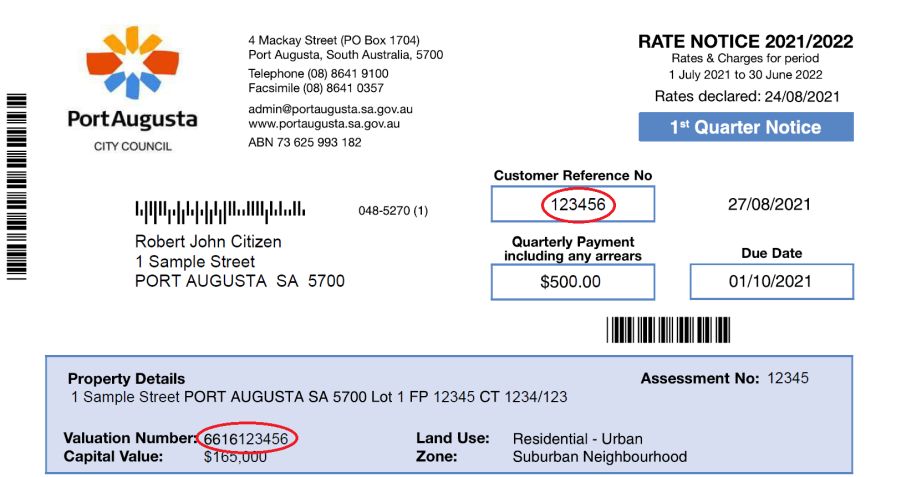
Checking Your Rates Balance
Checking your current outstanding rates balance is easy.
All you need to do is follow the steps below:
- Open our online system (opens in new window).
- Enter your customer reference number and click next. Your customer reference number can be found on your rates notice.
- Enter your valuation number and click next. Your valuation number can be found on your rates notice.
- Your rates balance will be displayed.
You can then proceed to make a payment if you wish.
Payment Arrangements
If you are having difficulty in meeting your quarterly instalment payments you may wish to consider a more manageable weekly, fortnightly or monthly arrangement which can be accommodated with approval from council rating staff.
Recurring payments can be scheduled via BPAY. This can be done via your banking app, bank website or by visiting your nearest branch. Council's biller code is 27961. Payment reference is your Customer Reference Number which can be found on your rates notice.
Centrepay is a FREE direct bill paying service offered to persons receiving payments from Centrelink. You nominate the regular amount you wish to be deducted from your Centrelink benefit and that amount is then transferred automatically to the Council.
Go to servicesaustralia.gov.au/centrepay for more information on how to set up your Centrepay deductions.
Council’s Centrepay Reference Number (CRN) is 555 056 062V.
Obtain a transaction card from the Council office that is encoded with the Council Billpay code and your customer reference number - you are then able to pay weekly, fortnightly or as frequently as you can afford to do so each time you visit the Post Office.
Online Billing
Sign up to receive your rates notice electronically. With two great options, simply choose the best one for you. Here's how.
Once you're signed up, you can then view, download and pay your Rates Notice online.
Sign up to receive your rates notice electronically. With two great options, simply choose the best one for you. Here's how.
Ezybill
Sign up to Ezybill and get your rates notice delivered straight to your email.
Please note after registering for Ezybill you will no longer receive hard copies of your rates notice.
BPAY View
BPAY View is offered by many banks and billers. It’s an easy way to have your bills delivered directly to your online banking.
Depending on your bank you’ll receive a convenient SMS, email or bank message reminder to pay your bill. Its secure online access makes BPAY View easy to pay your bills on time.
You must sign up for BPAY View from your online bank or financial institution.
Please note after registering for BPAY View you will no longer receive hard copies of your rates notice.